
Many accounts. Zero links between them.
TrusLogin gives every account its own browser — a unique fingerprint, its own proxy and its own cookies — so platforms see separate real people, not one person with many accounts.
Windows 10/11 · works with Chrome or Edge · one key = 2 devices

Everything you need to run accounts safely
Built for marketers, e-commerce sellers, ad buyers and agencies.
Unique fingerprint per profile
Canvas, WebGL, audio, screen, CPU, memory, fonts, media devices, timezone and language — consistent and different for every profile, with a built-in consistency score.
Proxies done right
HTTP, HTTPS, SOCKS4 and SOCKS5 with password. Timezone, language and location follow the proxy IP automatically. No DNS or WebRTC leaks, and the browser never opens if the proxy is down.
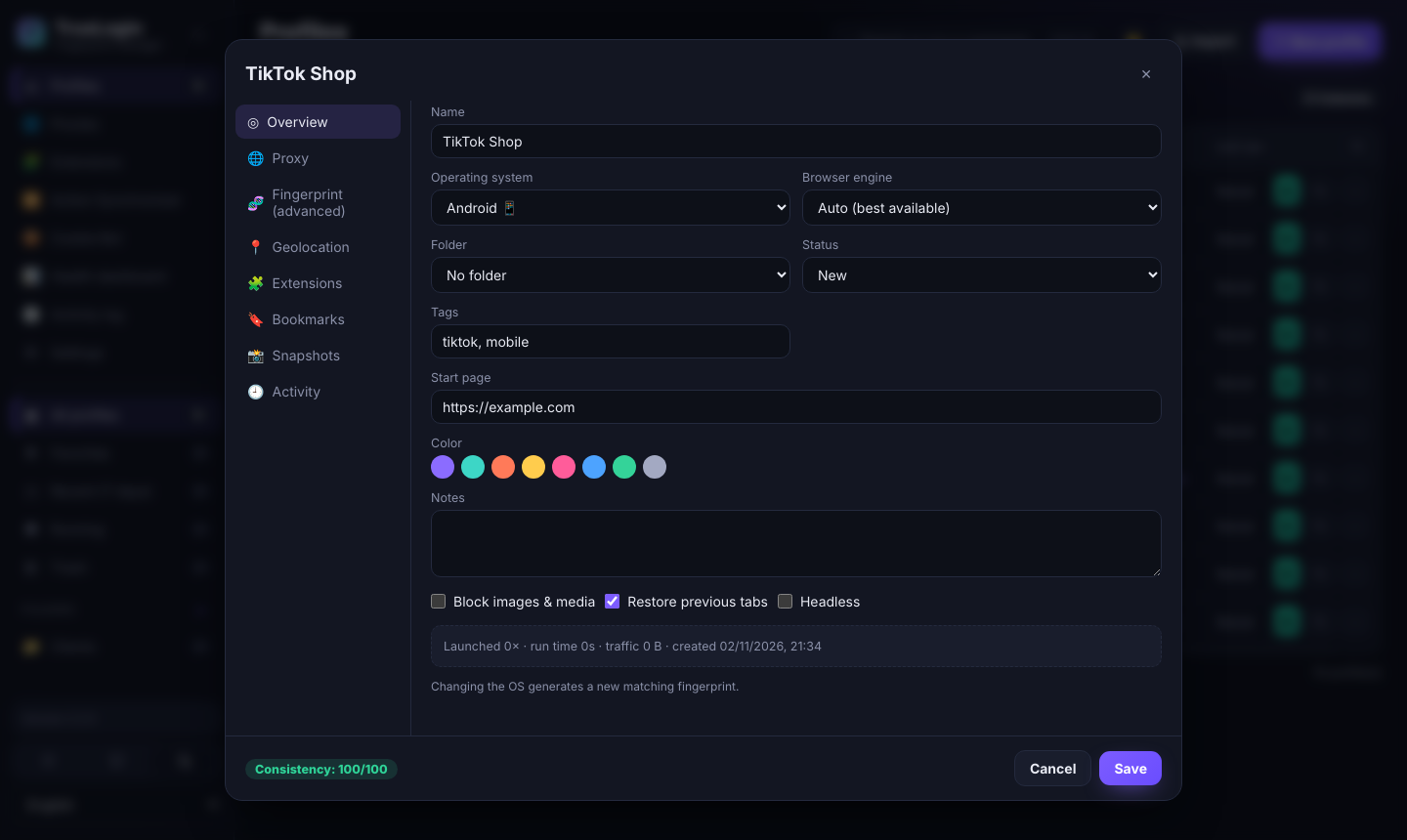
Android mobile profiles
Real mobile Chrome identity: phone screen, touch, mobile GPU and mobile Client Hints — for TikTok, Instagram and mobile-first platforms.
Sessions that stay
Every profile keeps its own cookies, logins, history and storage. Close it today, open it next month — still logged in.
Action Synchronizer
Click, type and scroll in one browser and repeat it live in many others. Pause, per-profile control and emergency stop.
Cookie Bot
Warm up new profiles automatically: visits your site list, scrolls, accepts cookie banners — with strict safety limits.
Extensions & bookmarks
One extension library for all profiles with versions and bulk assignment. Bookmarks in simple folder::name::url format.
Snapshots & encrypted backups
Save a profile state and roll back anytime. AES-256 encrypted automatic backups with a built-in recovery test.
Automation API
Local REST API compatible with GoLogin: start a profile and connect Playwright, Puppeteer or Selenium in two lines.
Bulk management
Folders, tags, statuses, favorites, saved filters, drag & drop and bulk actions for hundreds of profiles.
Health & cost dashboard
Live sessions, proxy health, traffic per profile, error diagnostics and proxy cost forecasting.
9 languages, dark & light
Arabic (RTL), English, French, Spanish, German, Turkish, Russian, Portuguese and Chinese.
Start in 3 minutes
Get your key
Choose a plan and pay through our Telegram bot. Your key arrives instantly.
Install TrusLogin
Download the installer for Windows and run it. Updates install themselves.
Activate & create profiles
Paste your key, create your first profile, add a proxy and press Start.
Clean, fast and professional


Simple pricing
All features in every plan. Each key works on 2 devices. The subscription starts the day you activate.
Lifetime
- 2 devices
- Unlimited profiles
- 2 devices
- All features
- Lifetime updates
- Priority support
Payment via Telegram bot · Automatic crypto checkout coming soon
₿ Crypto (USDT, BTC…) — coming soon
Frequently asked questions
What exactly is TrusLogin?
A desktop app that creates isolated browser profiles. Each profile looks like a different computer to websites: different fingerprint, IP (through your proxy), cookies and storage.
How do I get a key?
Press "Buy a key", choose a plan in our Telegram bot and pay. The bot sends your key immediately.
Can I use one key on two computers?
Yes. Each key works on up to 2 devices at the same time. To move it to a new computer, deactivate an old one from the app (Settings → License) or from the "My license" page.
When does my subscription start?
On the day you first activate the key in the app — not the day you buy it.
Do I need proxies?
For real separation between accounts, yes: every profile should have its own proxy. TrusLogin supports all common proxy types and checks them for you.
Does it work offline?
The app re-checks your license online every few hours and keeps working without internet for up to 7 days.
Windows shows "Windows protected your PC"
This appears for new apps that are not yet widely downloaded. Click "More info" then "Run anyway".
Is my data sent to your servers?
No. Profiles, cookies and proxies stay on your computer. The only data sent to us is your key and an anonymous device ID for license checks.